> For the complete documentation index, see [llms.txt](https://docs.affiliaters.in/llms.txt). Markdown versions of documentation pages are available by appending `.md` to page URLs; this page is available as [Markdown](https://docs.affiliaters.in/social-platforms/facebook.md).

# Facebook

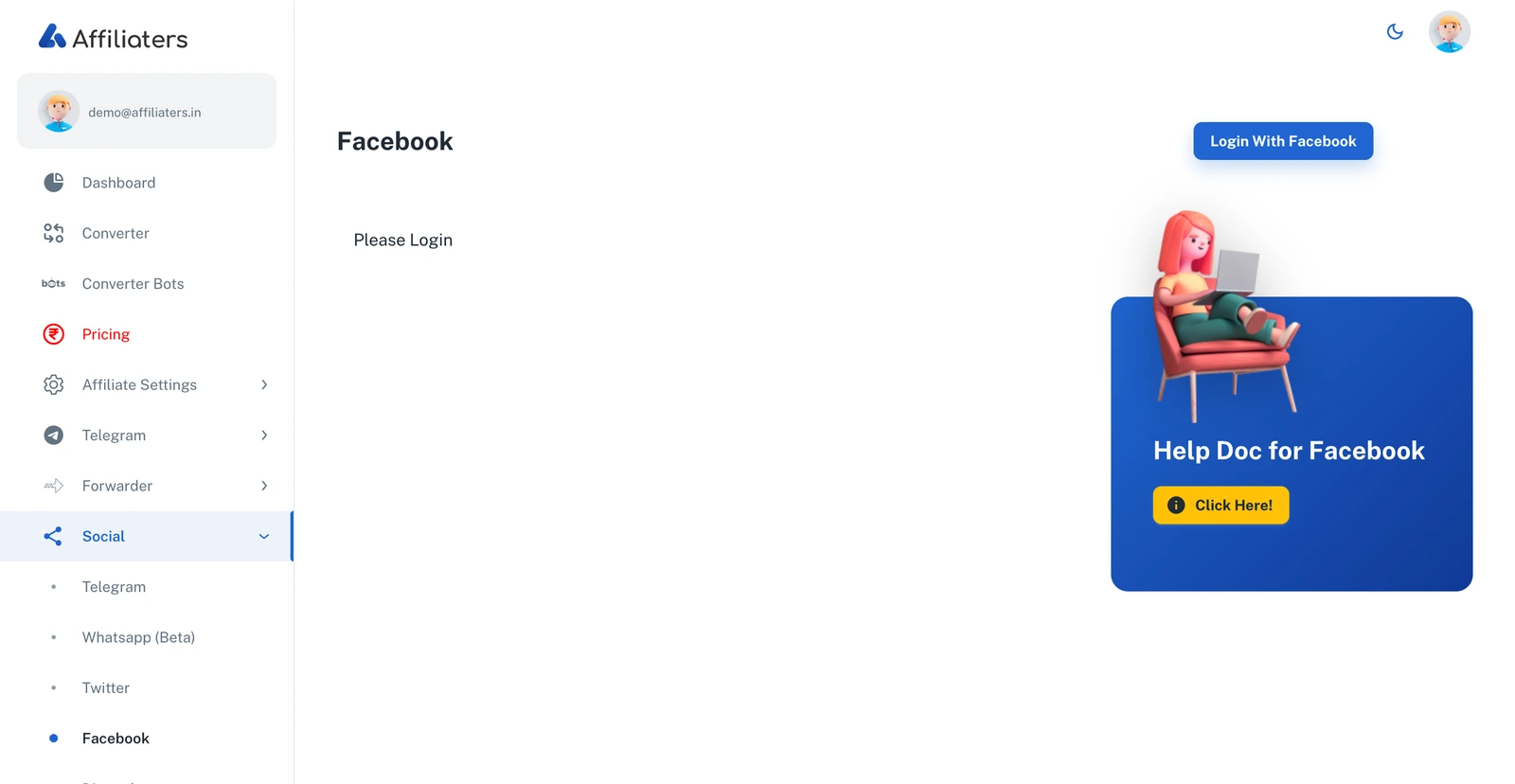
<figure><img src="https://116777058-files.gitbook.io/~/files/v0/b/gitbook-x-prod.appspot.com/o/spaces%2F5DqSGQTeKzLe8SU5WFwA%2Fuploads%2Fgit-blob-3af78d3c0def1050235887ad751a0d538d533b09%2Ffacebook-login.webp?alt=media" alt="Facebook page with Login With Facebook button"><figcaption><p>The Facebook page in Affiliaters</p></figcaption></figure>

## URL

<https://app.affiliaters.in/social/facebook>

Connect your Facebook **pages** so Affiliaters can post converted deals to them automatically. Connecting works with a **Facebook long token** that you generate from your own Facebook developer app — the one-time guide below walks you through it.

## What you need

* A Facebook account that **manages at least one page**.
* A **Facebook long token** — [how to generate one](#create-a-facebook-app) (one-time setup, about 10 minutes).

## Connect Facebook to Affiliaters

1. Go to **Social > Facebook** and click **Login with Facebook**.
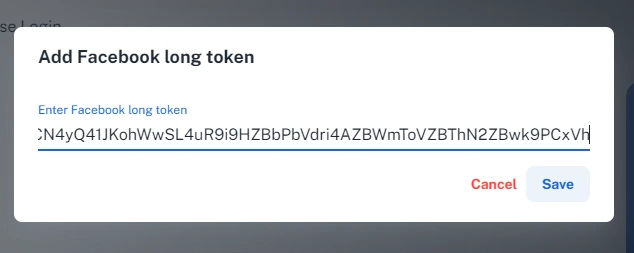
2. In the popup, paste your **Facebook long token** and save.

<figure><img src="https://116777058-files.gitbook.io/~/files/v0/b/gitbook-x-prod.appspot.com/o/spaces%2F5DqSGQTeKzLe8SU5WFwA%2Fuploads%2Fgit-blob-a502487074d703253bcf25e92af70280288cbf84%2Ffacebook-20.webp?alt=media" alt="Add Facebook long token popup" width="476"><figcaption><p>Paste your long token</p></figcaption></figure>

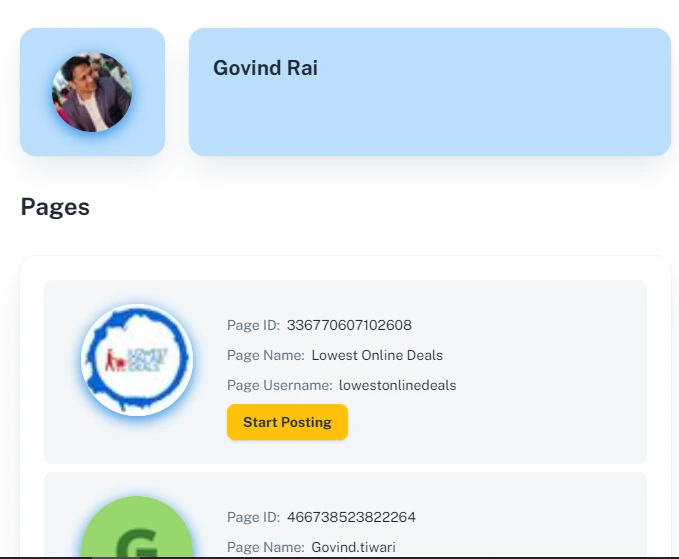
3. If the token is correct, all your pages appear in a list.

<figure><img src="https://116777058-files.gitbook.io/~/files/v0/b/gitbook-x-prod.appspot.com/o/spaces%2F5DqSGQTeKzLe8SU5WFwA%2Fuploads%2Fgit-blob-8cad783fb8ec4e34415e56963449921571c6ab2c%2Ffacebook-21.webp?alt=media" alt="Facebook pages listed after adding the token" width="509"><figcaption><p>Your pages appear once the token is accepted</p></figcaption></figure>

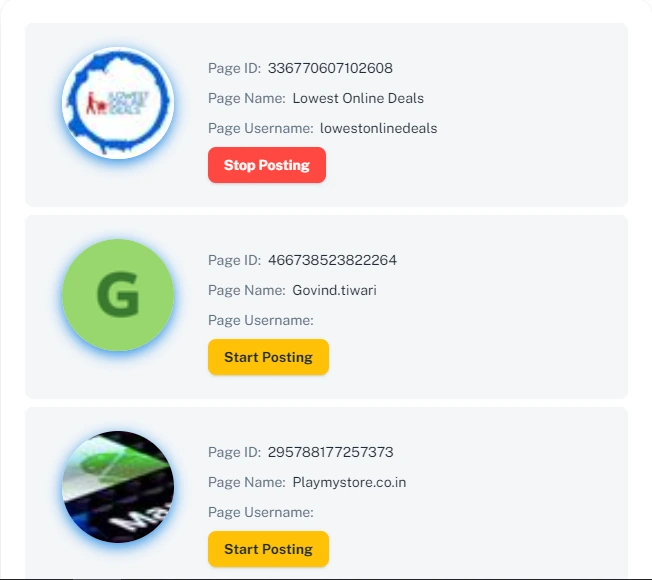
4. Click **Start Posting** on each page where your deals should be published.

<figure><img src="https://116777058-files.gitbook.io/~/files/v0/b/gitbook-x-prod.appspot.com/o/spaces%2F5DqSGQTeKzLe8SU5WFwA%2Fuploads%2Fgit-blob-69376cacefd2a6676335f71225b3fec043b2ab14%2Ffacebook-22.webp?alt=media" alt="Start Posting button on a page" width="489"><figcaption><p>Turn on posting per page</p></figcaption></figure>

## What success looks like

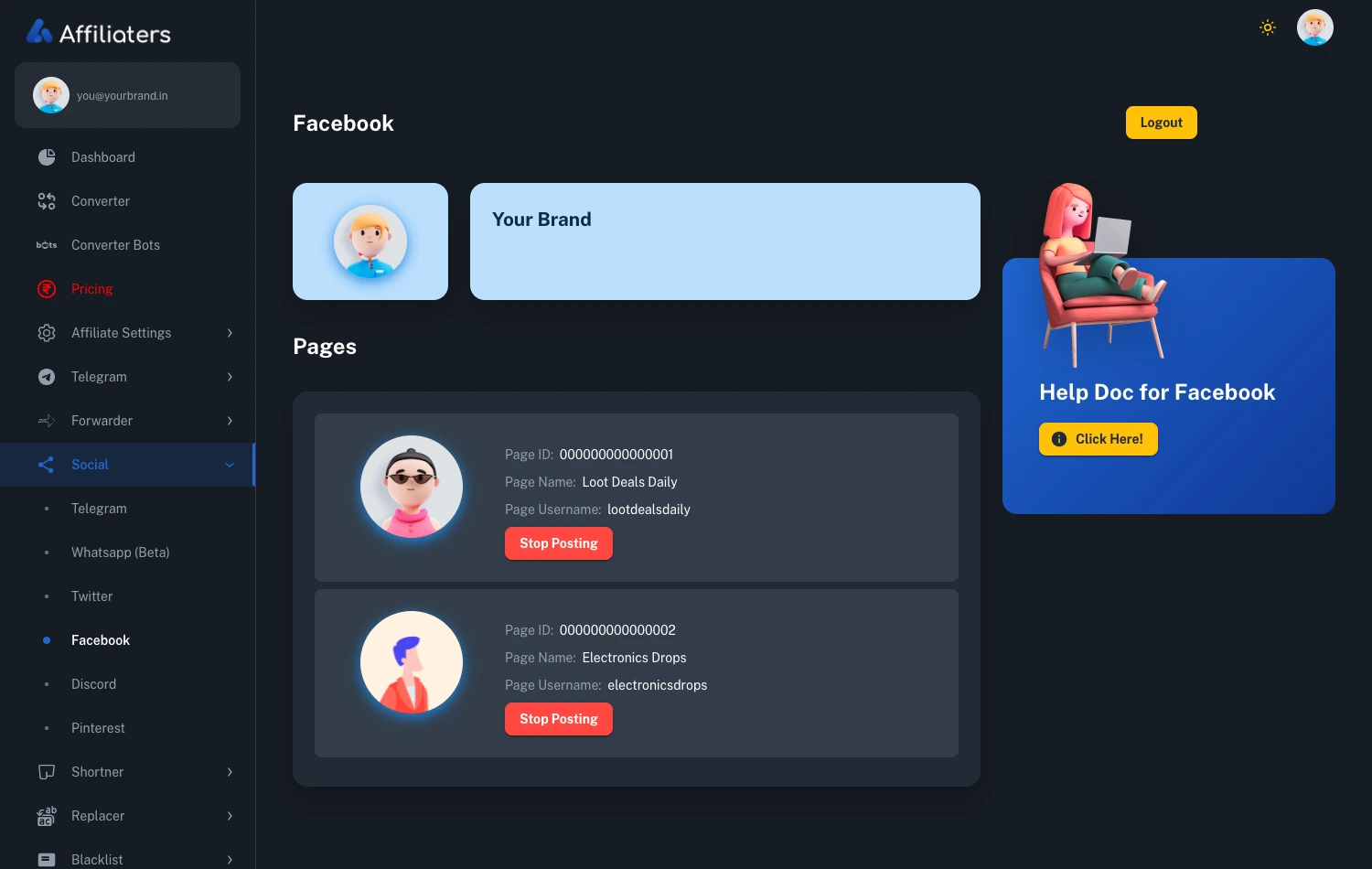
Once connected, the page shows your Facebook account at the top and every page from your token, each with its own posting toggle:

<figure><img src="https://116777058-files.gitbook.io/~/files/v0/b/gitbook-x-prod.appspot.com/o/spaces%2F5DqSGQTeKzLe8SU5WFwA%2Fuploads%2Fgit-blob-11724f10a8d11291a8601a32e2de0b3c5af25476%2Ffacebook-connected.webp?alt=media" alt="Connected Facebook account with pages listed and Stop Posting buttons"><figcaption><p>Connected — your pages are listed and posting is active (the button switches to Stop Posting)</p></figcaption></figure>

## Create a Facebook app

The long token comes from your **own free Facebook developer app** — you create it once and reuse it.

1. Go to [https://developers.facebook.com](https://developers.facebook.com/) and sign up or log in.
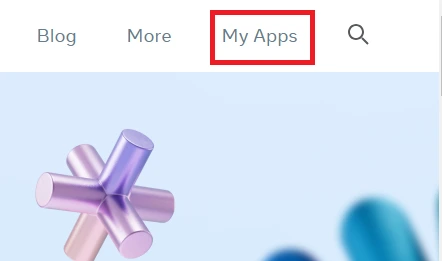
2. Open **My Apps**.

<figure><img src="https://116777058-files.gitbook.io/~/files/v0/b/gitbook-x-prod.appspot.com/o/spaces%2F5DqSGQTeKzLe8SU5WFwA%2Fuploads%2Fgit-blob-53f750ddbda14563fef3af31c5c073b31989743b%2Ffacebook-1.webp?alt=media" alt="My Apps menu on developers.facebook.com"><figcaption><p>My Apps</p></figcaption></figure>

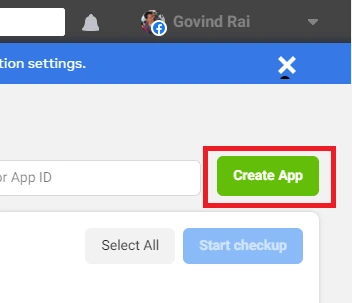
3. Click **Create App**.

<figure><img src="https://116777058-files.gitbook.io/~/files/v0/b/gitbook-x-prod.appspot.com/o/spaces%2F5DqSGQTeKzLe8SU5WFwA%2Fuploads%2Fgit-blob-665555b86e3297ac7e315c32eef4c47d5ccd794a%2Ffacebook-2.webp?alt=media" alt="Create App button"><figcaption><p>Create a new app</p></figcaption></figure>

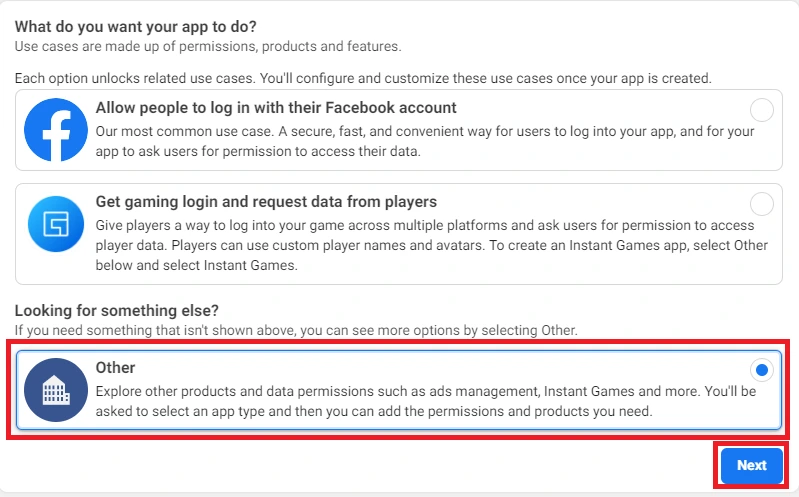
4. Select **Other**, then press **Next**.

<figure><img src="https://116777058-files.gitbook.io/~/files/v0/b/gitbook-x-prod.appspot.com/o/spaces%2F5DqSGQTeKzLe8SU5WFwA%2Fuploads%2Fgit-blob-778cfb44c0f0514248e59a60d17e9f40443be9b5%2Ffacebook-3.webp?alt=media" alt="Other option in use case selection" width="563"><figcaption><p>Choose Other</p></figcaption></figure>

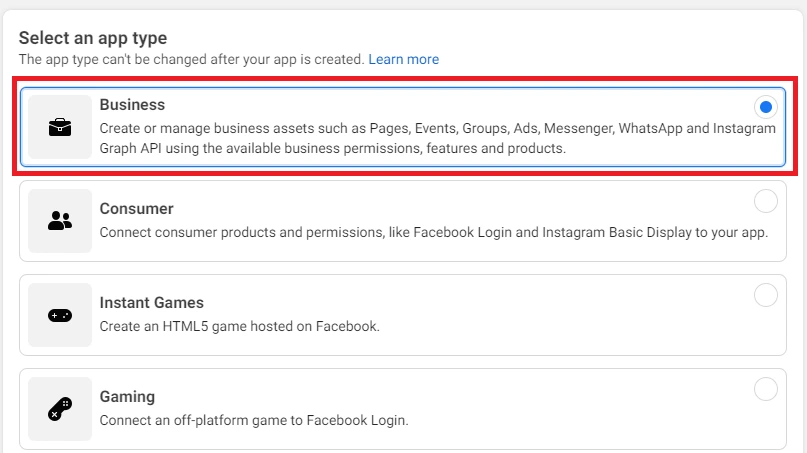
5. Select **Business** as the app type.

<figure><img src="https://116777058-files.gitbook.io/~/files/v0/b/gitbook-x-prod.appspot.com/o/spaces%2F5DqSGQTeKzLe8SU5WFwA%2Fuploads%2Fgit-blob-0d3618e5ed0d6fdefaa630d811defb1c04666268%2Ffacebook-4.webp?alt=media" alt="Business app type" width="563"><figcaption><p>Choose Business</p></figcaption></figure>

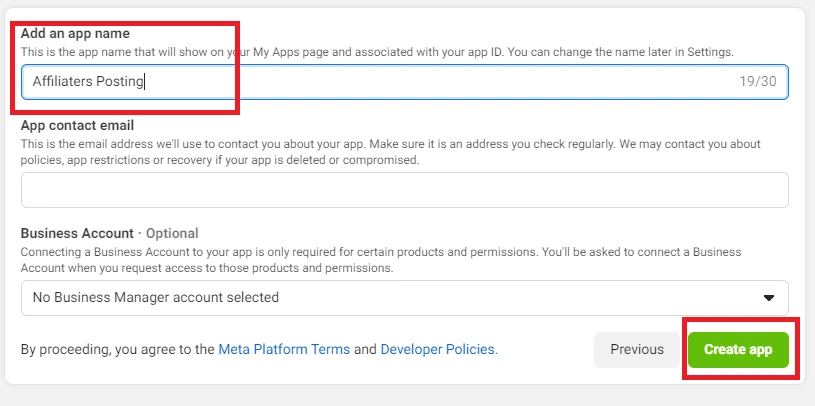
6. Enter any app name (for example **Affiliaters Posting**) and press **Create App**.

<figure><img src="https://116777058-files.gitbook.io/~/files/v0/b/gitbook-x-prod.appspot.com/o/spaces%2F5DqSGQTeKzLe8SU5WFwA%2Fuploads%2Fgit-blob-63462c9467e00553a601b83e53563ea63a701234%2Ffacebook-5.webp?alt=media" alt="App name field and Create App button" width="563"><figcaption><p>Name it anything you like</p></figcaption></figure>

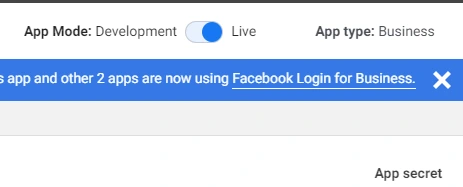
7. Switch the app from **Development** to **Live**.

<figure><img src="https://116777058-files.gitbook.io/~/files/v0/b/gitbook-x-prod.appspot.com/o/spaces%2F5DqSGQTeKzLe8SU5WFwA%2Fuploads%2Fgit-blob-57cab1b8a3210aa0dde5ac4814b957009e70060e%2Ffacebookapplive.webp?alt=media" alt="App mode toggle set to Live"><figcaption><p>Make the app Live</p></figcaption></figure>

## Generate a short-lived token

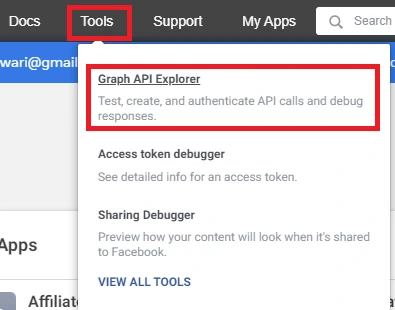
1. Go to **Tools > Graph API Explorer**.

<figure><img src="https://116777058-files.gitbook.io/~/files/v0/b/gitbook-x-prod.appspot.com/o/spaces%2F5DqSGQTeKzLe8SU5WFwA%2Fuploads%2Fgit-blob-58d6537c09387f93030184f897b52f8592bd3d93%2Ffacebook-6.webp?alt=media" alt="Graph API Explorer in the Tools menu"><figcaption><p>Tools → Graph API Explorer</p></figcaption></figure>

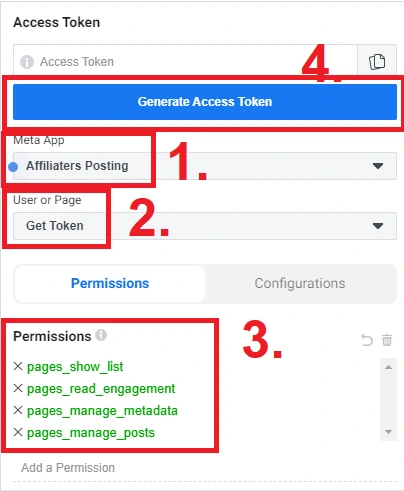
2. In **Meta App**, select the app you just created.
3. In **User or Page**, select **Get User Access Token**.
4. Add these **permissions**:
   * `pages_show_list`
   * `pages_read_engagement`
   * `pages_manage_metadata`
   * `pages_manage_posts`
   * `business_management`
5. Press **Generate Access Token**.

<figure><img src="https://116777058-files.gitbook.io/~/files/v0/b/gitbook-x-prod.appspot.com/o/spaces%2F5DqSGQTeKzLe8SU5WFwA%2Fuploads%2Fgit-blob-5e5433fe1ade746548b0e32d5b472c71556a5844%2Ffacebook-7.webp?alt=media" alt="Graph API Explorer with app, token type and permissions selected"><figcaption><p>App + permissions, then Generate Access Token</p></figcaption></figure>

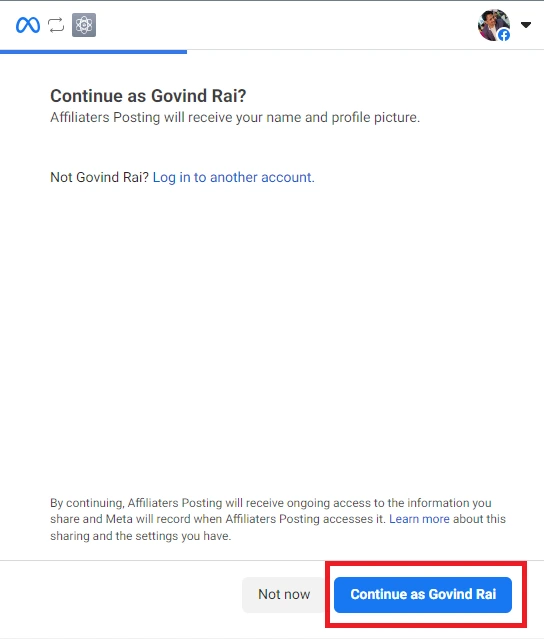
6. A Facebook window opens — press **Continue as \<your name>**.

<figure><img src="https://116777058-files.gitbook.io/~/files/v0/b/gitbook-x-prod.appspot.com/o/spaces%2F5DqSGQTeKzLe8SU5WFwA%2Fuploads%2Fgit-blob-395f9b8e55caa483d8a628e738e95995364ea7e9%2Ffacebook-8.webp?alt=media" alt="Continue as authorization window" width="408"><figcaption><p>Authorize your own app</p></figcaption></figure>

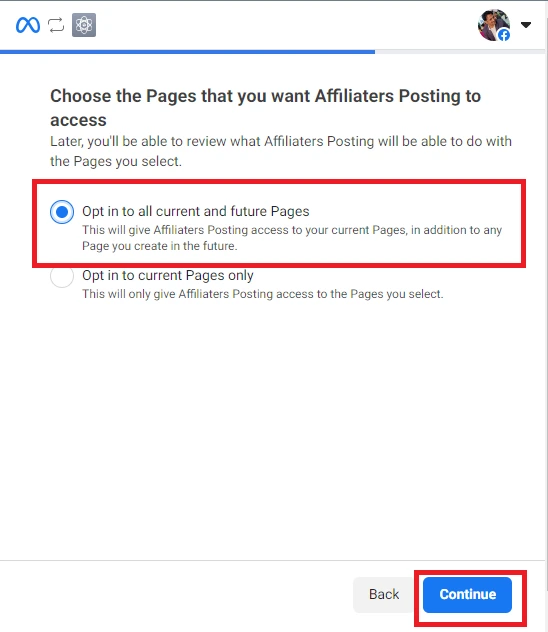
7. Select **Opt in to all current and future pages** (recommended — new pages will work without generating a new token), or pick only the pages you want.

<figure><img src="https://116777058-files.gitbook.io/~/files/v0/b/gitbook-x-prod.appspot.com/o/spaces%2F5DqSGQTeKzLe8SU5WFwA%2Fuploads%2Fgit-blob-54cdef7a246ea2307530c8f3139079260dfcf0c4%2Ffacebook-9.webp?alt=media" alt="Page selection with opt in to all pages option" width="411"><figcaption><p>Opt in to all pages so one token covers future pages too</p></figcaption></figure>

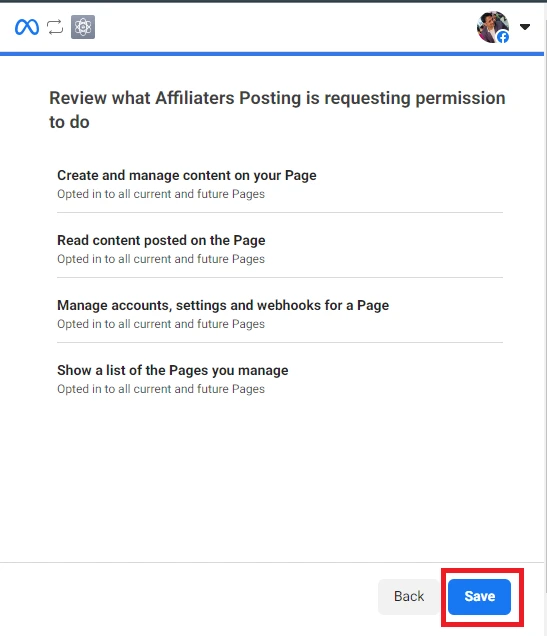
8. **Review** the settings, press **Save**, then **Got it**.

<figure><img src="https://116777058-files.gitbook.io/~/files/v0/b/gitbook-x-prod.appspot.com/o/spaces%2F5DqSGQTeKzLe8SU5WFwA%2Fuploads%2Fgit-blob-5547f00a25dca636849a2ca112038db6e7e4ac1f%2Ffacebook-10.webp?alt=media" alt="Review and Save step" width="410"><figcaption><p>Save and confirm</p></figcaption></figure>

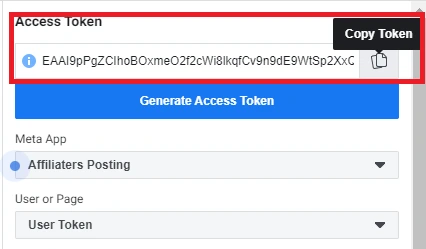
9. Copy the token from the **Access token** field — this is your **short-lived token**.

<figure><img src="https://116777058-files.gitbook.io/~/files/v0/b/gitbook-x-prod.appspot.com/o/spaces%2F5DqSGQTeKzLe8SU5WFwA%2Fuploads%2Fgit-blob-5453daa0c4d47b856e4871a76aeb2b3f4d48f03b%2Ffacebook-14.webp?alt=media" alt="Access token field in Graph API Explorer"><figcaption><p>Copy the short-lived token</p></figcaption></figure>

## Extend it to a long token

Short-lived tokens expire within hours — extend yours once and it lasts about **60 days**.

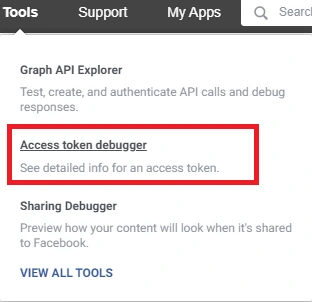
1. Go to **Tools > Access Token Debugger**.

<figure><img src="https://116777058-files.gitbook.io/~/files/v0/b/gitbook-x-prod.appspot.com/o/spaces%2F5DqSGQTeKzLe8SU5WFwA%2Fuploads%2Fgit-blob-bc903b614c5a780b62a032690c8054848b20d024%2Ffacebook-15.webp?alt=media" alt="Access Token Debugger in the Tools menu"><figcaption><p>Tools → Access Token Debugger</p></figcaption></figure>

2. Paste your short-lived token and press **Debug**.

<figure><img src="https://116777058-files.gitbook.io/~/files/v0/b/gitbook-x-prod.appspot.com/o/spaces%2F5DqSGQTeKzLe8SU5WFwA%2Fuploads%2Fgit-blob-e4e482461907b33d78094463ba9fdf65f003a015%2Ffacebook-16.webp?alt=media" alt="Access token pasted in the debugger"><figcaption><p>Debug the short-lived token</p></figcaption></figure>

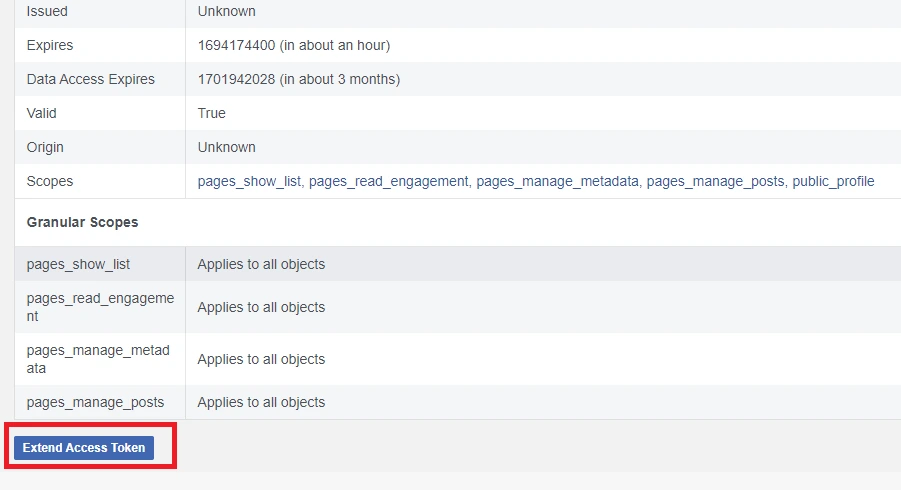
3. Press **Extend Access Token** at the bottom.

<figure><img src="https://116777058-files.gitbook.io/~/files/v0/b/gitbook-x-prod.appspot.com/o/spaces%2F5DqSGQTeKzLe8SU5WFwA%2Fuploads%2Fgit-blob-6ef40e847e119b0f02c75623c8a05d2b8c0dc796%2Ffacebook-17.webp?alt=media" alt="Extend Access Token button" width="563"><figcaption><p>Extend the token</p></figcaption></figure>

4. Copy the new **green token** — this is the long token. Paste it in Affiliaters ([steps above](#connect-facebook-to-affiliaters)).

<figure><img src="https://116777058-files.gitbook.io/~/files/v0/b/gitbook-x-prod.appspot.com/o/spaces%2F5DqSGQTeKzLe8SU5WFwA%2Fuploads%2Fgit-blob-78c4da9f0c294577689e819154669b28024e8eec%2Ffacebook-18.webp?alt=media" alt="Extended long token shown in green"><figcaption><p>Copy the green long token</p></figcaption></figure>

## Troubleshooting

* **Pages don't appear after saving the token?** The token is invalid or missing permissions — regenerate it with all five permissions listed above, extend it again, and re-save.
* **A page is missing from the list?** You didn't include it when authorizing your app. Generate a new token and choose **Opt in to all current and future pages** in the page-selection step.
* **Posting stopped after \~60 days?** Long tokens expire. Generate a fresh short-lived token in Graph API Explorer, extend it, and save the new long token — the app you created is reusable, so this takes a minute.