> For the complete documentation index, see [llms.txt](https://docs.affiliaters.in/llms.txt). Markdown versions of documentation pages are available by appending `.md` to page URLs; this page is available as [Markdown](https://docs.affiliaters.in/social-platforms/telegram.md).

# Telegram

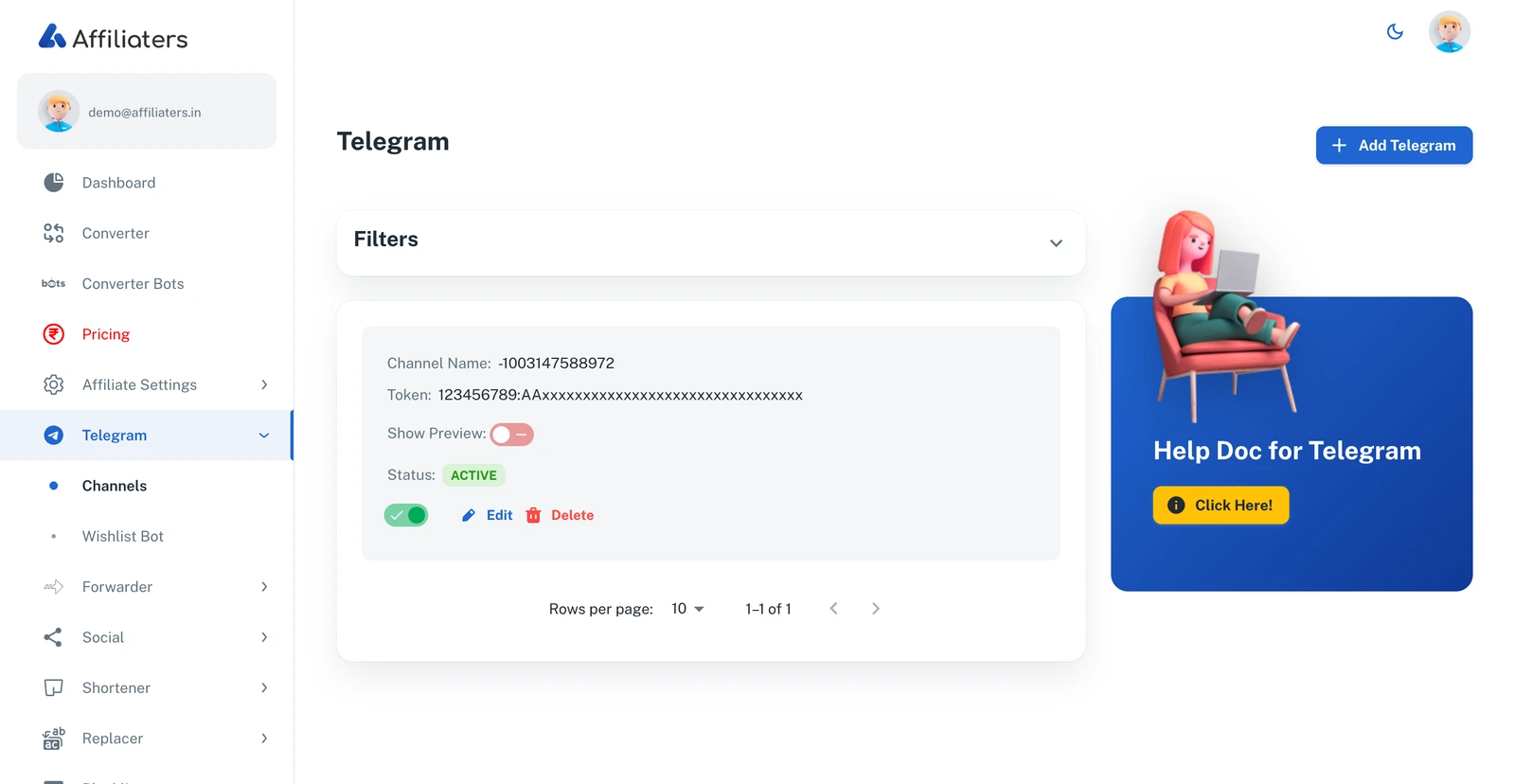
<figure><img src="https://116777058-files.gitbook.io/~/files/v0/b/gitbook-x-prod.appspot.com/o/spaces%2F5DqSGQTeKzLe8SU5WFwA%2Fuploads%2Fgit-blob-262df387e1e0877576491255ae7b4a4ae8a2146a%2Ftelegram-channels.webp?alt=media" alt="Telegram channels page"><figcaption><p>The Telegram channels page with a connected channel</p></figcaption></figure>

## URL

<https://app.affiliaters.in/telegram/channels>

Connect your Telegram channels or groups so Affiliaters can post converted deals to them automatically. Once added, each channel appears in the list with its status, a **Show Preview** toggle (link previews on/off for its posts), and **Edit**/**Delete** buttons.

## What you need

* A **bot token** — from Telegram's @BotFather ([how to create one](#make-a-bot-with-botfather-and-get-the-token)).
* Your **channel username** (public channels) or **chat ID** (private channels/groups).
* The bot must be an **admin** of the channel with permission to post ([how to add it](#add-the-bot-to-your-channel-as-admin)).

## How to add a channel in Affiliaters

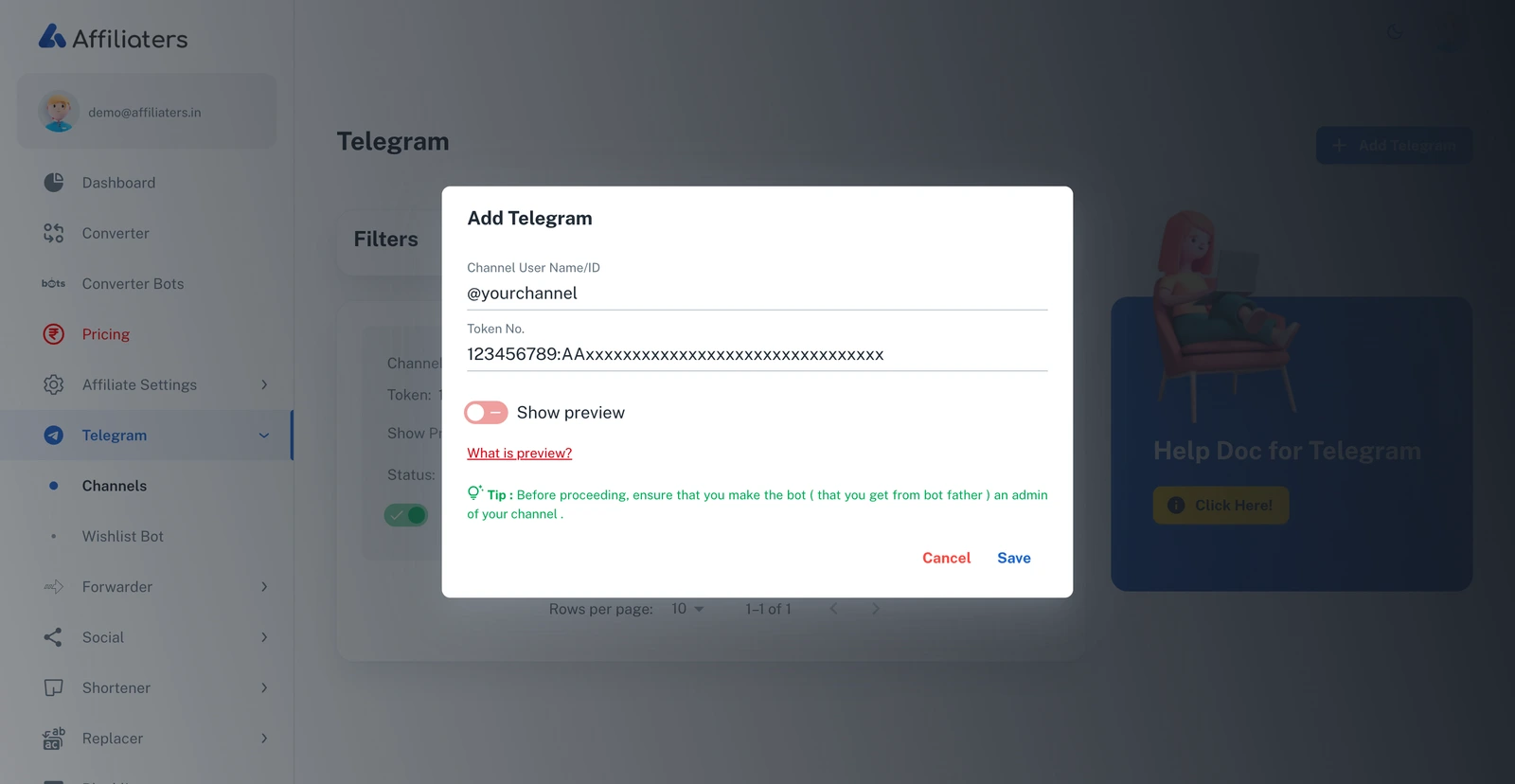
1. Open **Telegram > Channels** and click **Add Telegram**.

<figure><img src="https://116777058-files.gitbook.io/~/files/v0/b/gitbook-x-prod.appspot.com/o/spaces%2F5DqSGQTeKzLe8SU5WFwA%2Fuploads%2Fgit-blob-f427c471867fffee4f6e6b536bdedddec6fcafa0%2Ftelegram-add.webp?alt=media" alt="Add Telegram dialog with Channel User Name/ID, Token and Show preview fields"><figcaption><p>The Add Telegram dialog</p></figcaption></figure>

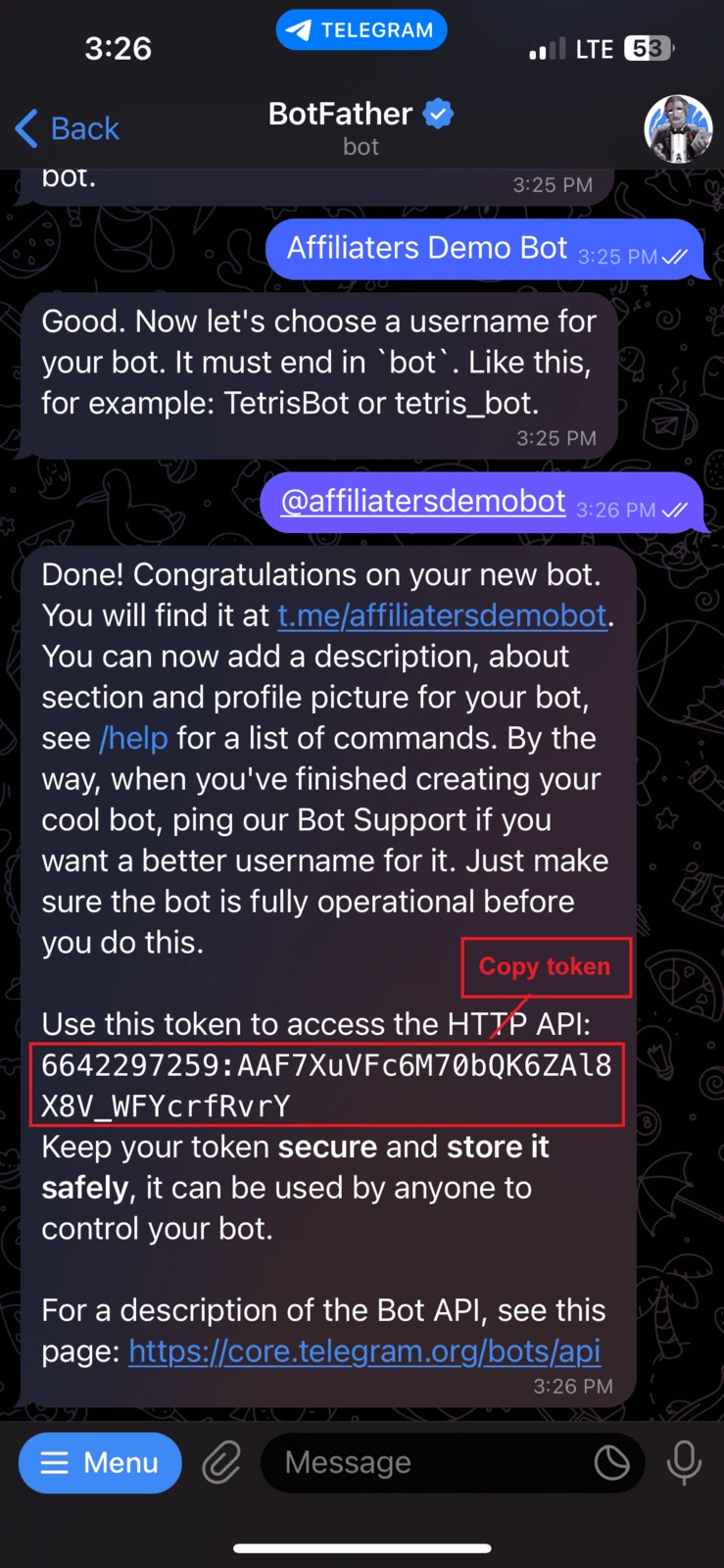
2. **Token No.** — paste the bot token you got from @BotFather.

{% hint style="info" %}
Before saving, make sure the bot is already an **admin of your channel** — the tip inside the dialog reminds you of this too.
{% endhint %}

<figure><img src="https://116777058-files.gitbook.io/~/files/v0/b/gitbook-x-prod.appspot.com/o/spaces%2F5DqSGQTeKzLe8SU5WFwA%2Fuploads%2Fgit-blob-c6c1fc4da5e3ac2ac1bc7bb595b35cac105f827c%2Ftokens.webp?alt=media" alt="Bot token from BotFather" width="188"><figcaption><p>The token as BotFather sends it</p></figcaption></figure>

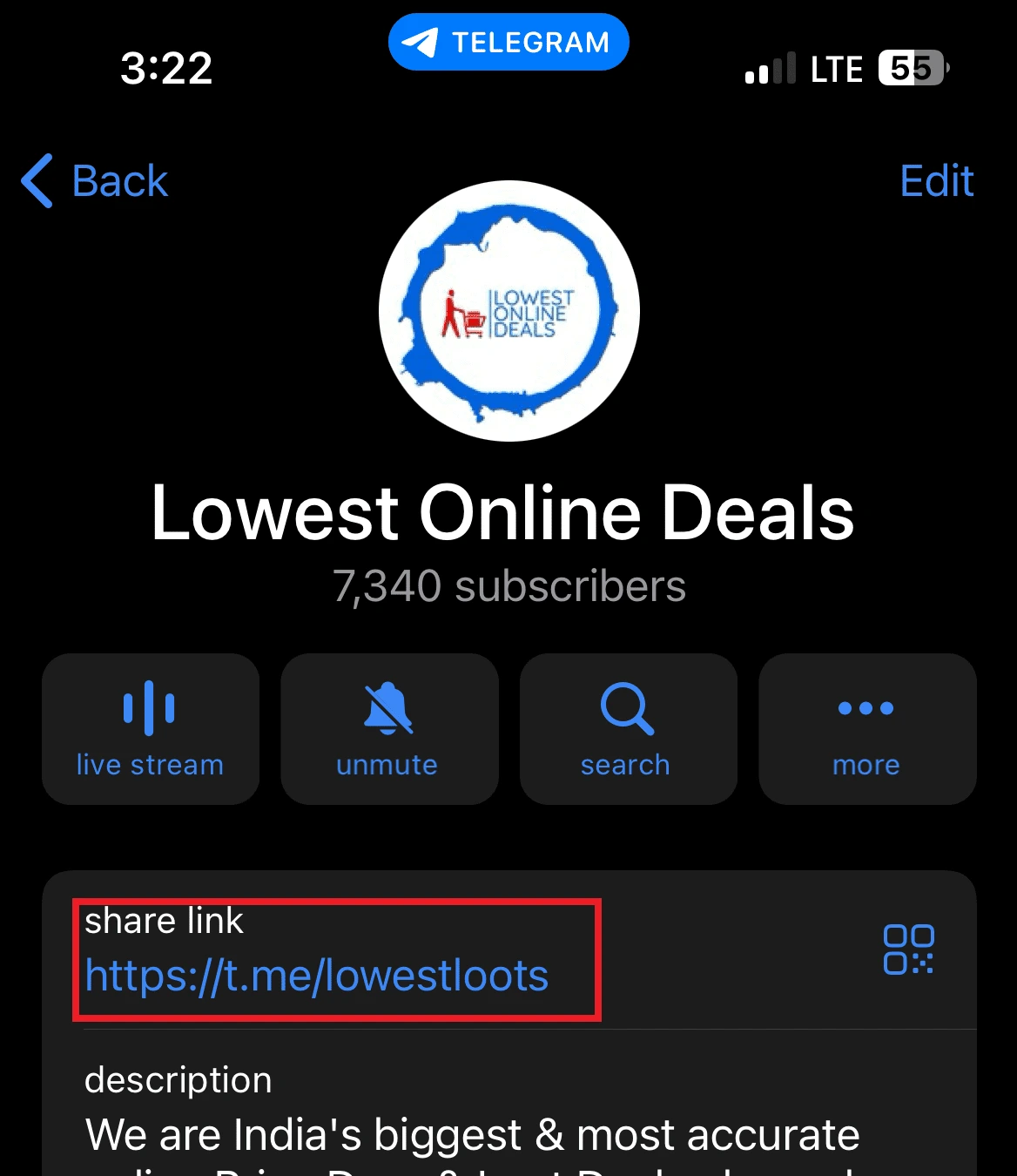
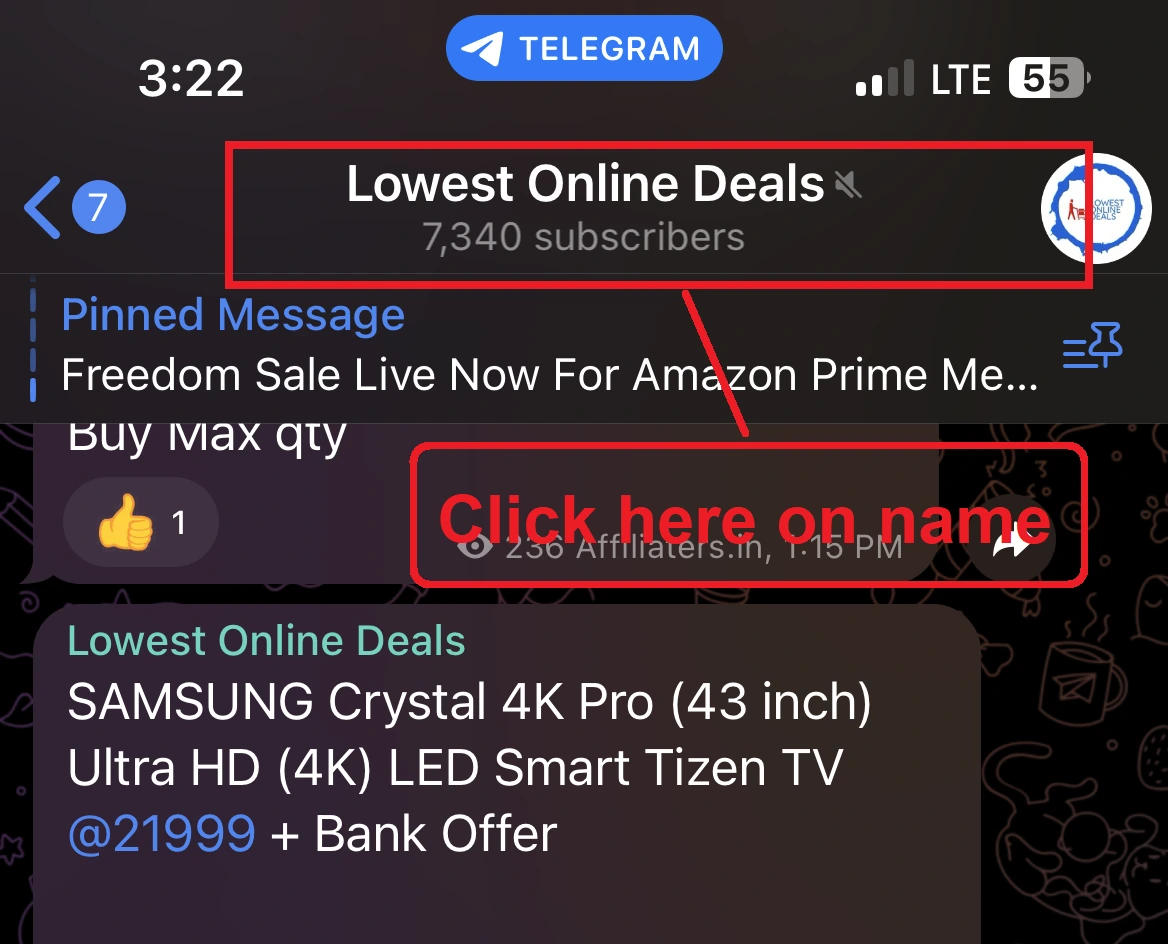
3. **Channel User Name/ID** — your channel's username. Tap your channel's name in Telegram and copy it from **Share Link**.

<figure><img src="https://116777058-files.gitbook.io/~/files/v0/b/gitbook-x-prod.appspot.com/o/spaces%2F5DqSGQTeKzLe8SU5WFwA%2Fuploads%2Fgit-blob-32d1d38b15b7e63d4246264eaa876e3430a10019%2Ftelegram-share-link.webp?alt=media" alt="Channel info showing the share link" width="375"><figcaption><p>Find the username under Share Link</p></figcaption></figure>

{% hint style="info" %}
**Username format:** don't include `https://t.me/`. If your link is `t.me/lowestloots`, your username is **@lowestloots** — just the name with an `@` in front.
{% endhint %}

{% hint style="warning" %}
**Private channel or group?** It has no username — use its **chat ID** instead. [See how to get it below](#how-to-get-a-private-channel-group-id).
{% endhint %}

4. **Show preview** — turn on if you want Telegram link previews under your posts; off posts clean text only.
5. **Save**. Affiliaters will now post your converted deals to this channel.

## Make a bot with BotFather and get the token

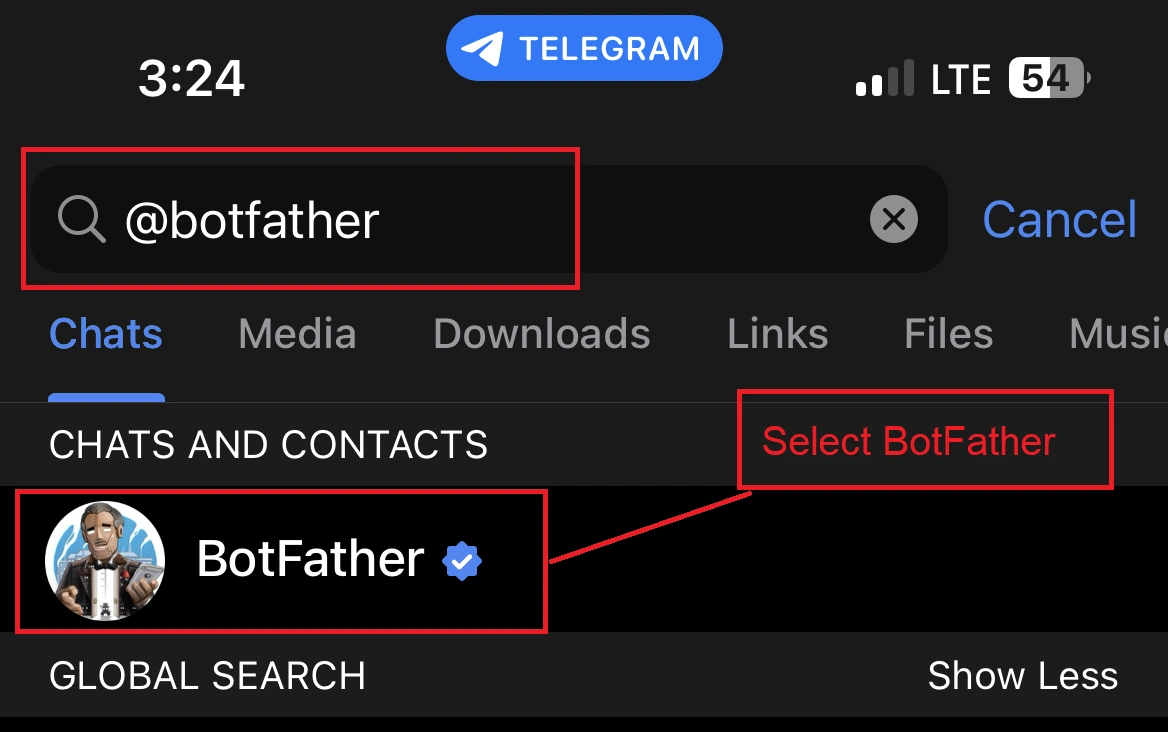
1. Open Telegram and search for **@BotFather** (Telegram's official bot for creating bots).

<figure><img src="https://116777058-files.gitbook.io/~/files/v0/b/gitbook-x-prod.appspot.com/o/spaces%2F5DqSGQTeKzLe8SU5WFwA%2Fuploads%2Fgit-blob-44ef1bbff8e4532f29ea44410da02e25d066872f%2Ftelegram-botfather-search.webp?alt=media" alt="Searching for BotFather in Telegram" width="375"><figcaption><p>Search for the official @BotFather</p></figcaption></figure>

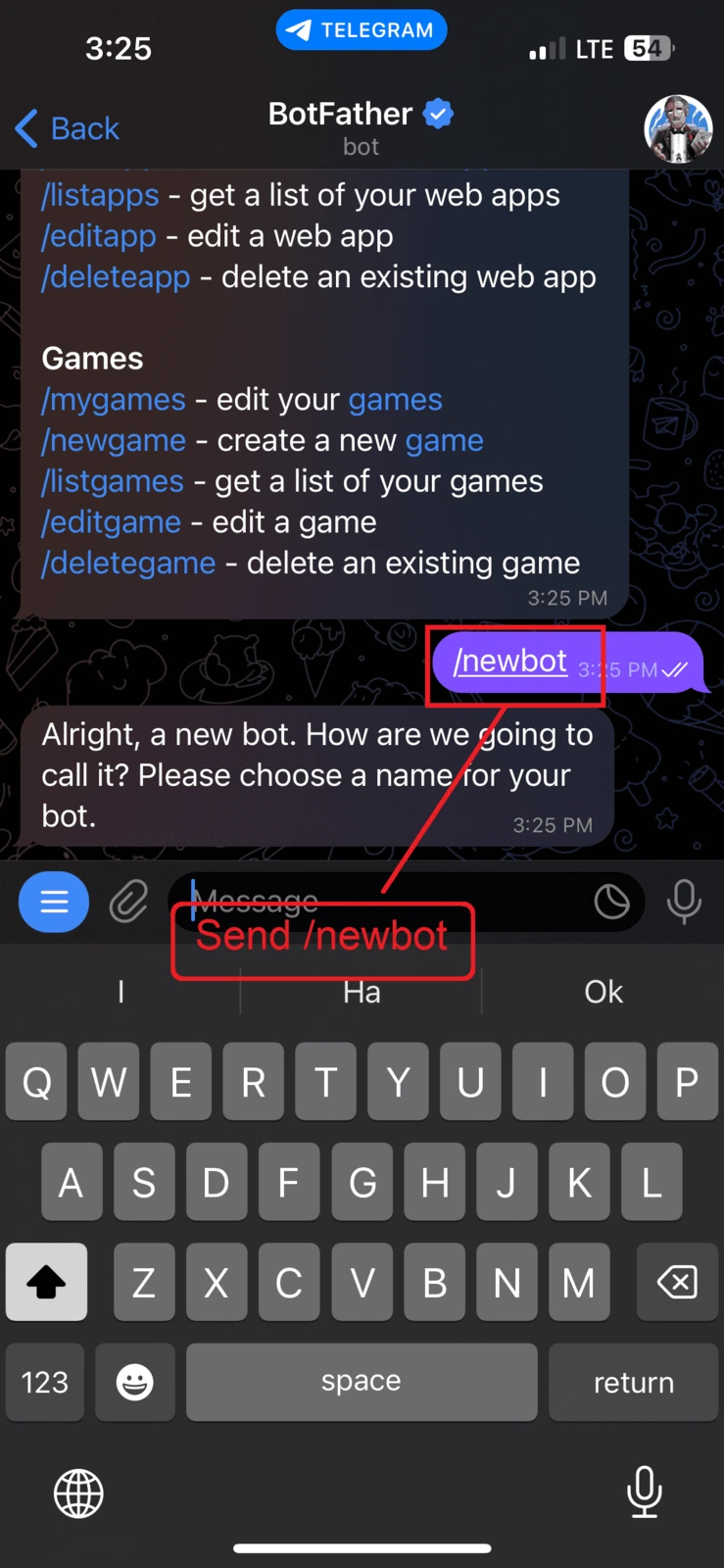
2. Start a chat with BotFather and send **/newbot**.

<figure><img src="https://116777058-files.gitbook.io/~/files/v0/b/gitbook-x-prod.appspot.com/o/spaces%2F5DqSGQTeKzLe8SU5WFwA%2Fuploads%2Fgit-blob-254455a02ae21de9706189ba2259194486298938%2Ftelegram-newbot.webp?alt=media" alt="Sending /newbot to BotFather" width="188"><figcaption><p>Send /newbot</p></figcaption></figure>

3. Send a **name** for your bot, then a **username** (must end in `bot`). BotFather replies with your **token** — copy it.

![Choosing the bot name](https://116777058-files.gitbook.io/~/files/v0/b/gitbook-x-prod.appspot.com/o/spaces%2F5DqSGQTeKzLe8SU5WFwA%2Fuploads%2Fgit-blob-c12ca64d39c7edfd5eff6cf173db4114840601f9%2Ftelegram-bot-name.webp?alt=media) ![BotFather reply with the token](https://116777058-files.gitbook.io/~/files/v0/b/gitbook-x-prod.appspot.com/o/spaces%2F5DqSGQTeKzLe8SU5WFwA%2Fuploads%2Fgit-blob-eff27f02f382afddabc419c62a021e014d856625%2Ftelegram-bot-token.webp?alt=media)

## Add the bot to your channel as admin

1. Open your Telegram channel or group. (Don't have one? Tap the **three lines** in the top-left corner and choose **New Channel** or **New Group**.)

<figure><img src="https://116777058-files.gitbook.io/~/files/v0/b/gitbook-x-prod.appspot.com/o/spaces%2F5DqSGQTeKzLe8SU5WFwA%2Fuploads%2Fgit-blob-5dc132e1a03c9c79baca443074945e1f384a59e2%2Ftelegram-create-channel.webp?alt=media" alt="Creating a new channel in Telegram" width="375"><figcaption><p>Create a channel or group if you don't have one</p></figcaption></figure>

2. Open the channel settings and tap **Administrators**.

![Channel settings](https://116777058-files.gitbook.io/~/files/v0/b/gitbook-x-prod.appspot.com/o/spaces%2F5DqSGQTeKzLe8SU5WFwA%2Fuploads%2Fgit-blob-ea852e496178962c84f3235e0d392f2ac0e55f53%2Ftelegram-channel-settings.webp?alt=media) ![Administrators option](https://116777058-files.gitbook.io/~/files/v0/b/gitbook-x-prod.appspot.com/o/spaces%2F5DqSGQTeKzLe8SU5WFwA%2Fuploads%2Fgit-blob-7ef46f8f0f7273df54ed39e039b59449e78db27b%2Ftelegram-administrators.webp?alt=media)

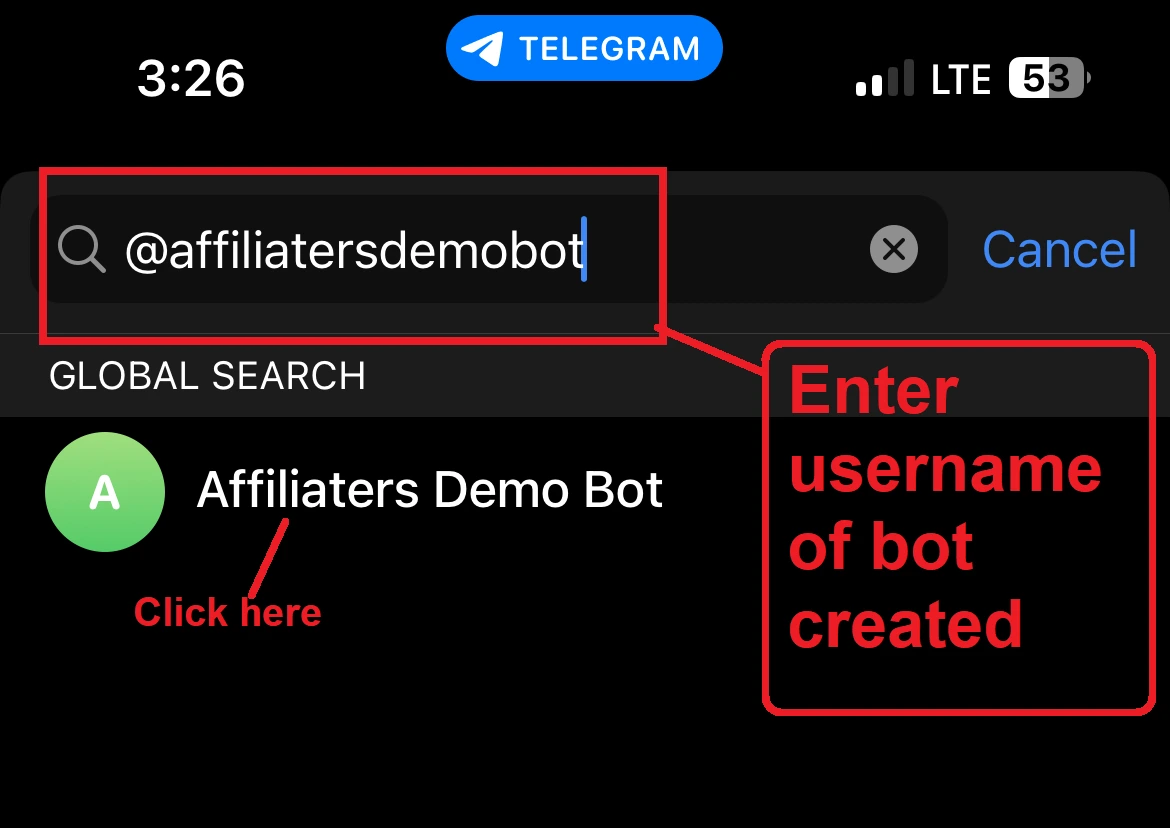
3. Tap the search bar and type your **bot's username**.

<figure><img src="https://116777058-files.gitbook.io/~/files/v0/b/gitbook-x-prod.appspot.com/o/spaces%2F5DqSGQTeKzLe8SU5WFwA%2Fuploads%2Fgit-blob-91de8bba210effecb28c683942c392bb54234b20%2Ftelegram-search-bot.webp?alt=media" alt="Searching the bot in the administrators list" width="375"><figcaption><p>Search for your bot by username</p></figcaption></figure>

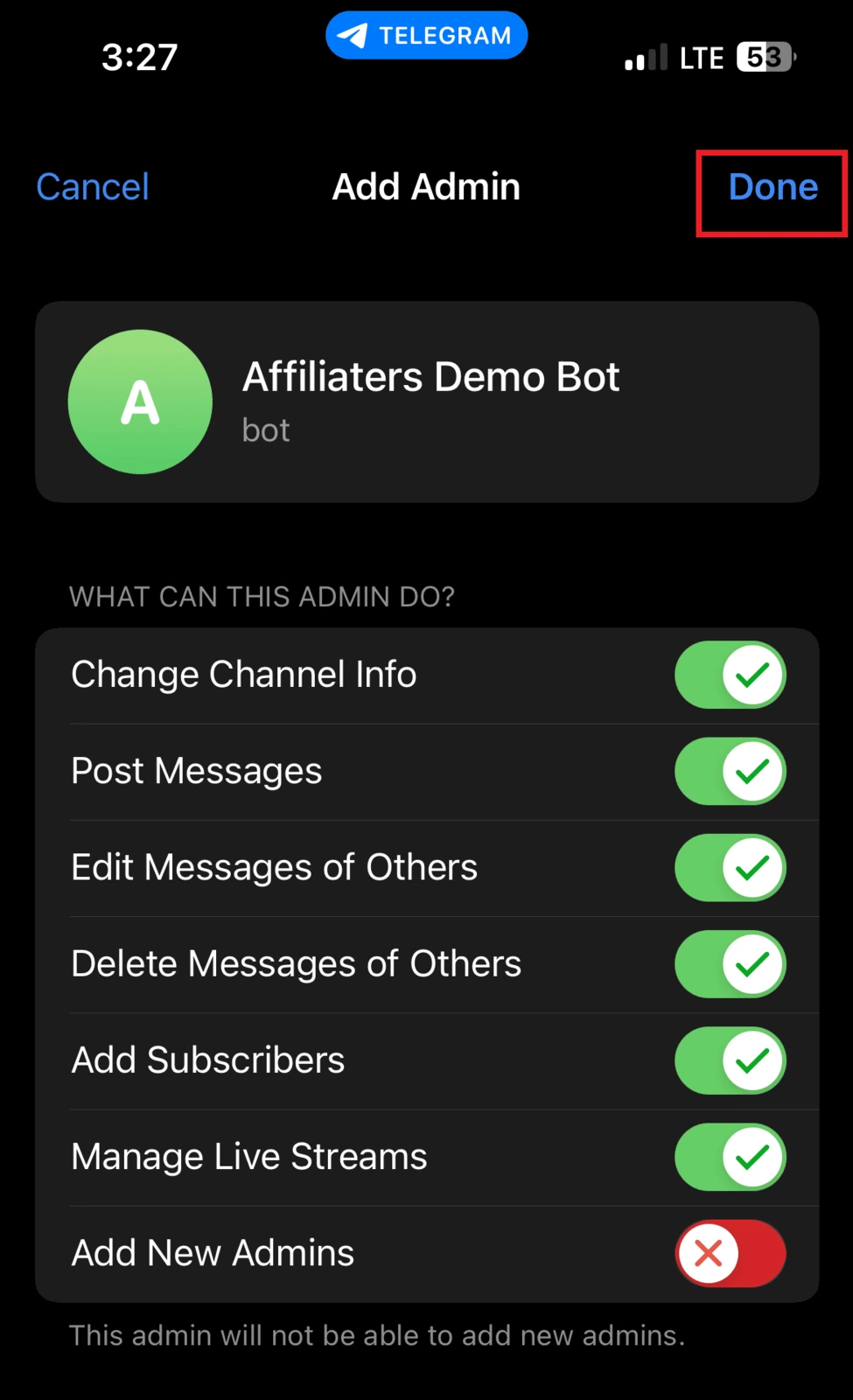
4. Select your bot and give it the **Post Messages** permission, then confirm. Your bot can now post in the channel.

<figure><img src="https://116777058-files.gitbook.io/~/files/v0/b/gitbook-x-prod.appspot.com/o/spaces%2F5DqSGQTeKzLe8SU5WFwA%2Fuploads%2Fgit-blob-1e31eb101d7de9e6ab7ac34c379977b29ebda7f1%2Ftelegram-post-permission.webp?alt=media" alt="Bot admin permissions" width="188"><figcaption><p>Give the bot Post Messages permission</p></figcaption></figure>

## How to get a private Channel / Group ID

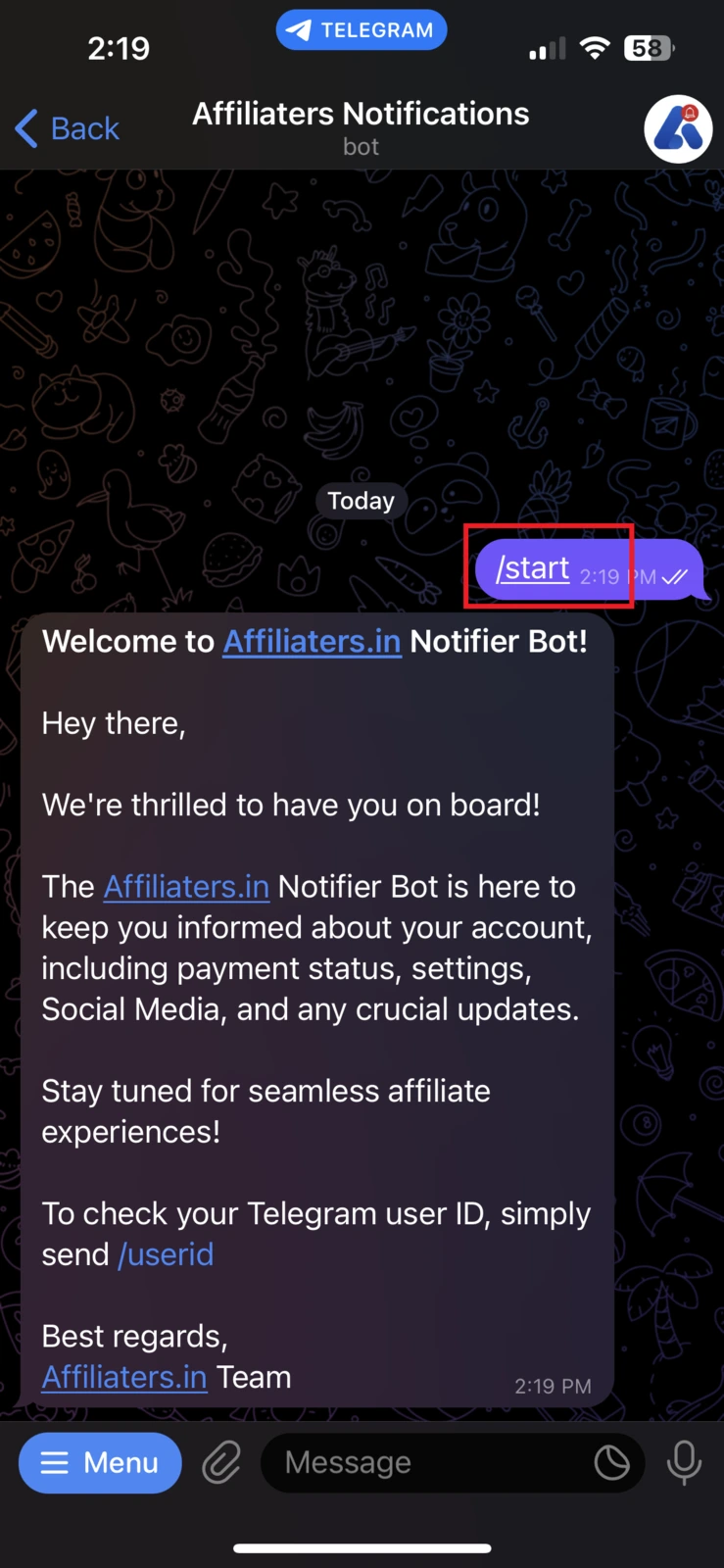
1. Start our bot [@AffiliatersNotifyBot](https://t.me/AffiliatersNotifyBot) first.

{% embed url="<https://t.me/AffiliatersNotifyBot>" %}

<figure><img src="https://116777058-files.gitbook.io/~/files/v0/b/gitbook-x-prod.appspot.com/o/spaces%2F5DqSGQTeKzLe8SU5WFwA%2Fuploads%2Fgit-blob-633bdd1277104433d3227422b00161942c2593cd%2Ftelegram-notify-bot-start.webp?alt=media" alt="Starting AffiliatersNotifyBot" width="188"><figcaption><p>Start the Notify Bot</p></figcaption></figure>

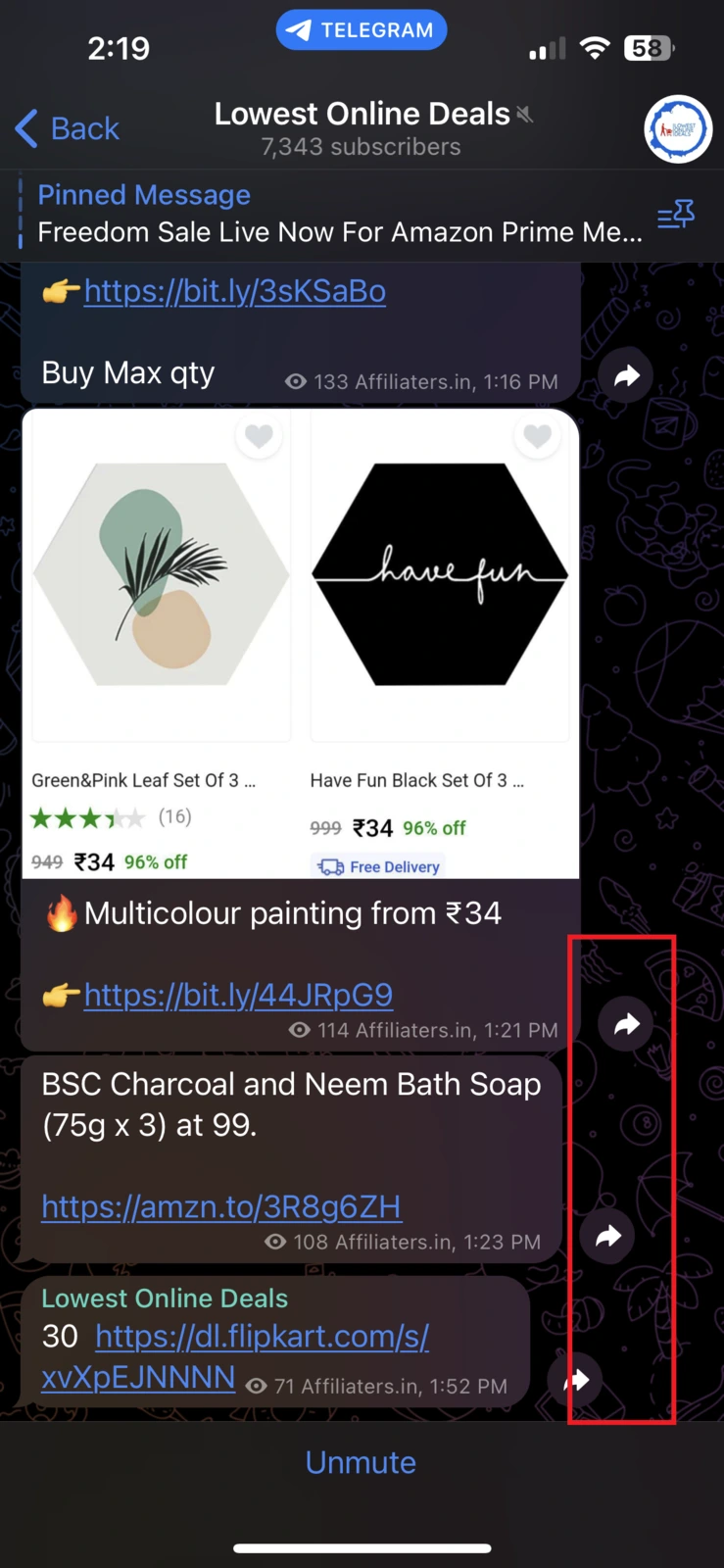
2. Go to your private channel or group, select any message, and press **Forward**.

<figure><img src="https://116777058-files.gitbook.io/~/files/v0/b/gitbook-x-prod.appspot.com/o/spaces%2F5DqSGQTeKzLe8SU5WFwA%2Fuploads%2Fgit-blob-ffc5a299ce1e816de2d75cdb70810edb94e724e1%2Ftelegram-forward-message.webp?alt=media" alt="Forwarding a message from the channel" width="188"><figcaption><p>Forward any message from your channel</p></figcaption></figure>

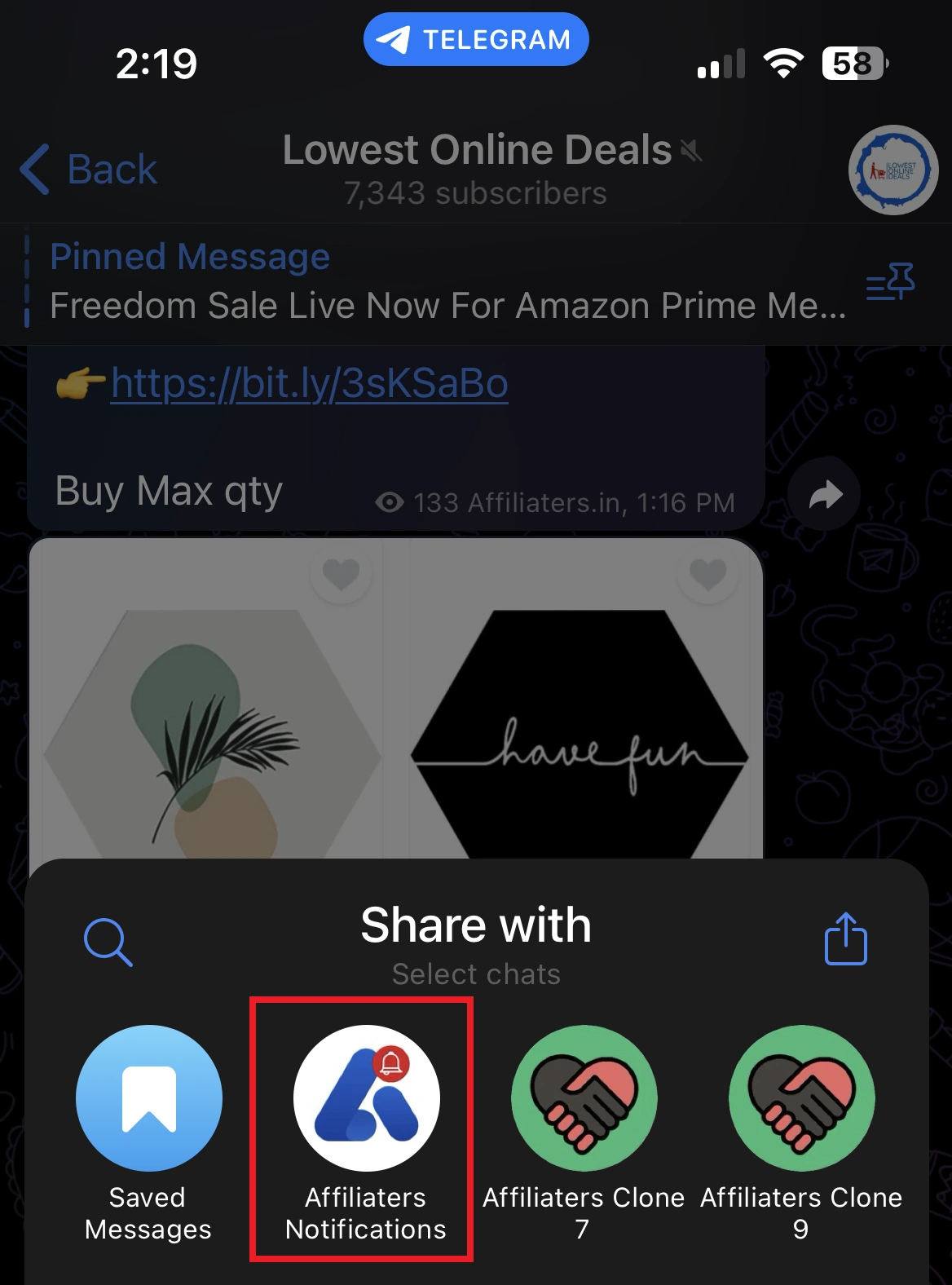
3. Forward the message to our **Notify Bot**.

<figure><img src="https://116777058-files.gitbook.io/~/files/v0/b/gitbook-x-prod.appspot.com/o/spaces%2F5DqSGQTeKzLe8SU5WFwA%2Fuploads%2Fgit-blob-7952b12d92bef2e96912f5bcde2a5a93a4c57f21%2Ftelegram-forward-to-bot.webp?alt=media" alt="Sending the forwarded message to the Notify Bot" width="188"><figcaption><p>Send it to @AffiliatersNotifyBot</p></figcaption></figure>

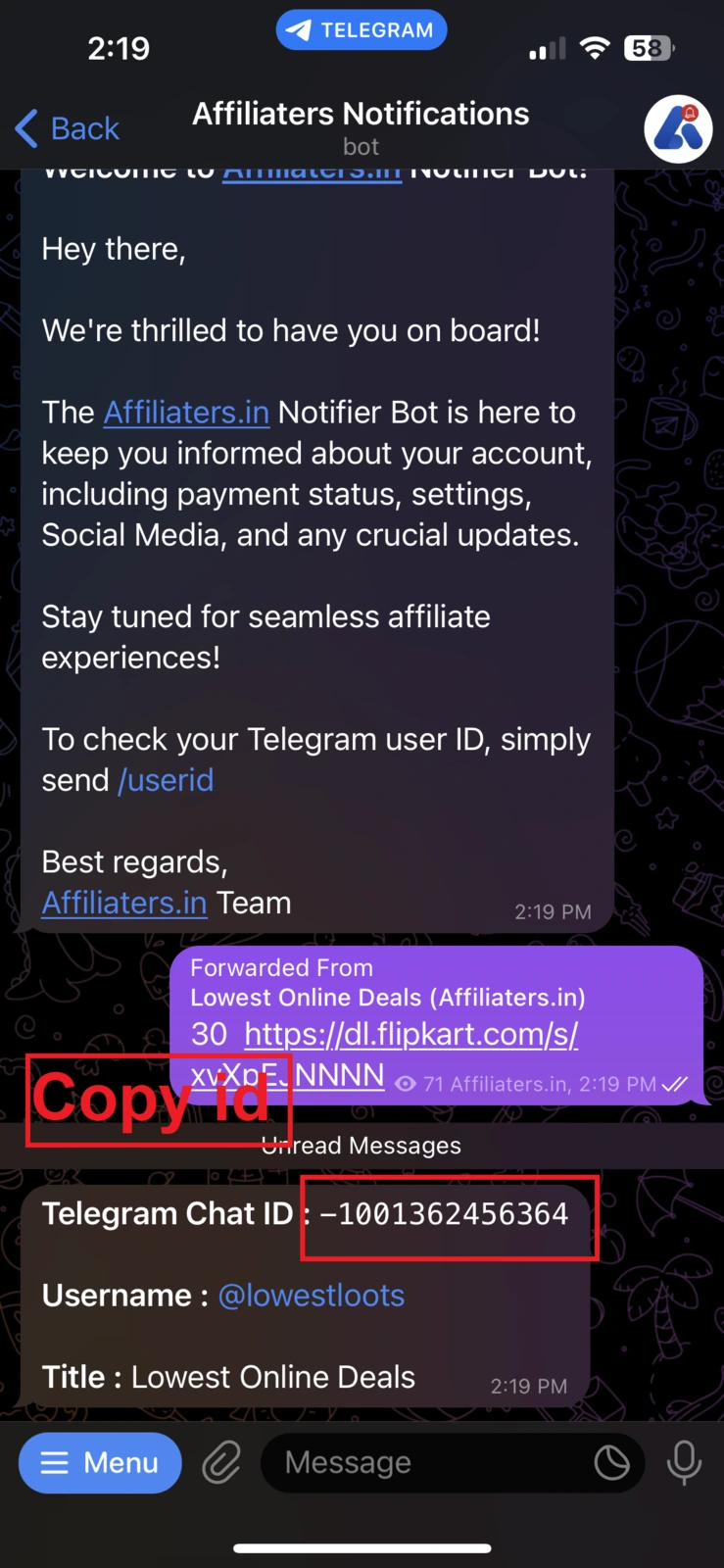
4. The bot replies with your **Telegram Chat ID** (it may start with `-100`). Tap it to copy, then use this ID **instead of the channel username** in the Add Channel form.

<figure><img src="https://116777058-files.gitbook.io/~/files/v0/b/gitbook-x-prod.appspot.com/o/spaces%2F5DqSGQTeKzLe8SU5WFwA%2Fuploads%2Fgit-blob-1c63125c267777118b4da50e1fd1f82854bda4c0%2Ftelegram-chat-id.webp?alt=media" alt="Bot reply with the chat ID" width="188"><figcaption><p>Tap the ID to copy it</p></figcaption></figure>